
Text-to-speech
Choose a voice, play responses, and manage saved audio.
Read conversation messages aloud with optional local CPU voices or a selected speech provider. Speech starts disabled, and enabling it does not download anything. Settings, installed voices, optional recordings and encrypted speech credentials are managed separately from the conversation archive.
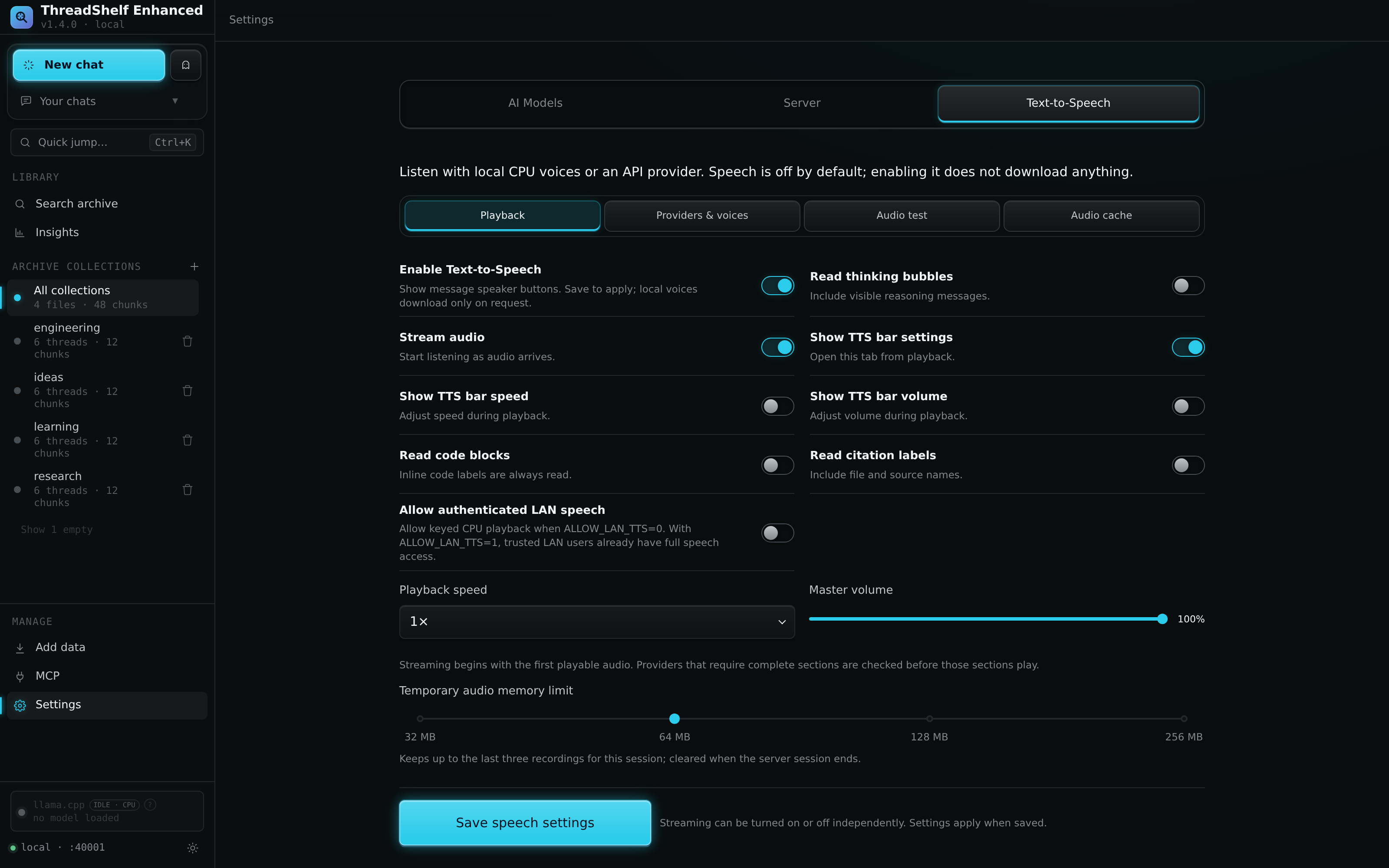
Set up speech for the first time
- Open Settings → Text-to-Speech.
- Enable speech and save the setting to expose message reading controls.
- Choose a local engine or an API provider.
- For a local engine, select Download local voices and review the exact platform, files, hashes, sizes, licenses and required free space.
- Install the selected voices and wait for their verified Ready state.
- Select a voice and use Audio test. Save the desired preferences, then use a message's speaker button to read it.
The test uses the current unsaved provider/voice selection. It neither saves preferences nor stores the preview in the recording cache. CPU testing stays disabled until that specific engine is installed and verified; installing Pocket does not make Kokoro ready. API previews do not require CPU voices.
Local and remote options
| Provider | Location | Requirements and scope |
|---|---|---|
| Pocket TTS | Server CPU | Explicit engine installation; six supplied English voices |
| Kokoro | Server CPU | Explicit engine installation; 28 supplied English voices |
| Self-hosted | Configured HTTP(S) endpoint | A compatible speech service, model and voice |
| ElevenLabs | External service | Suitable account/key and supported model/voice |
| OpenRouter speech | External service | An available speech model/voice and suitable credentials |
| OpenAI Realtime | External service | Supported Realtime model/voice and suitable credentials |
The supplied local engine payloads are pinned for Linux x64 and Windows x64. Other server platforms can use a compatible speech API. These local voice packs are English packs; selecting a different interface language does not add synthesis in that language. Engine/model file size also does not describe peak RAM consumption.
Local engines run offline after their runtime and assets have been installed. A self-hosted provider is local only if its endpoint is on the same machine; a LAN endpoint sends text to another computer. External services receive the text submitted for speech. The application does not silently fall back to a paid provider when a local engine fails.
Provider availability and model catalogs can change independently of this manual. Use the provider controls to select supported values, and review the actual service response when a previously working model or voice becomes unavailable.
Download, repair and remove voices
The source distribution contains the service and installer, not the model weights or runtime. Installation downloads missing files, verifies size and SHA-256, expands into a private staging directory, generates a short offline readiness sample, verifies the installed tree, and then activates the completed installation atomically.
A cancelled download is not marked Ready. Verified downloads and partial transfer files can be reused on retry. Repeating the download operation can repair an installation; a failed repair retains the previous working installation. Superseded installations are removed after active workers release them.
Settings, downloads, runtimes and saved audio live beneath .threadshelf/tts, or tts within an explicitly configured server data directory. Include that complete location in a stopped backup or migration. Disabling speech retains installed engines and recordings. Removing one engine preserves the other engine, speech preferences and audio recordings.
The installer includes the reviewed project-local runtime dependencies for its supported platforms. On Windows, required redistributable runtime DLLs are placed inside the speech installation rather than installed system-wide. Review the download plan's space estimate before starting; it includes staging and retained files, not only the final active model.
Playback controls
Message speaker buttons start reading. The floating playback bar provides pause, resume, stop and the enabled extra controls. Playback speed and volume affect listening; they do not require regenerating speech simply to change the player's speed or loudness.
Streaming controls whether validated playable chunks can be heard as they arrive or playback waits for a complete recording. Streaming does not provide invented word timing or guaranteed text highlighting. A paused recording remains protected from cleanup while its playback lease is active.
Speech content settings include whether to read code blocks and citation labels and whether thinking is included. Defaults exclude fenced code blocks, citation labels and thinking; inline code labels are still read. Review these options if technical messages sound unexpectedly short or dense. The complete message and extracted spoken content both contribute to cache identity, preventing an old recording from being reused after text changes.
Requests enter a bounded queue shared by the server: at most eight outstanding jobs, including active work, and two outstanding jobs per tab. Starting speech in one tab does not cancel another tab's work. Cancellation is associated with the owning tab's session identity. The player renews its lease while playing or paused; an abandoned lease expires after five minutes without a heartbeat.
Recordings, pins and cache reuse
Disk caching is off by default. When enabled, completed compatible recordings are selected in this order:
- A pinned recording for the same message/spoken content.
- A saved API recording when Prefer saved API audio is enabled.
- A recording matching the exact synthesis settings.
- A fresh synthesis request if nothing suitable exists.
Pins protect a recording from regeneration overwriting it. Changing provider or voice can make an ordinary cached recording stale, while a compatible pinned recording keeps its priority. The saved-API preference helps preserve an existing API-generated recording when local settings later change; disable that preference when a fresh synthesis under the current settings is desired.
The temporary RAM cache holds at most three recordings with a selectable 32, 64, 128 or 256 MiB limit; 64 MiB is the default. Disk limits and age settings are separate. Private chats neither read saved recordings nor retain newly generated audio in either cache. Temporary CPU working files are removed after completion or cancellation.
Treat saved speech as conversation data: it can contain the same sensitive information as the source text. Cache clearing is independent of deleting the underlying conversation. Inspect pins and currently active playback before expecting a cleanup operation to remove every recording.
Provider credentials
Speech keys can be retained for the server session or saved encrypted. Saved keys use AES-256-GCM with a passphrase-derived scrypt key. The passphrase is not saved, and credentials are locked after a server restart until unlocked. This applies to speech credential storage; it is not an encryption layer for the whole archive or every application setting.
Enter keys in their dedicated controls. Endpoint URLs cannot contain credentials or fragments. Keep a copy of provider credentials in an appropriate independent secret store so a lost passphrase does not become the only way to recover access.
Headless and LAN use
Full speech management is localhost-only by default. On a deliberately trusted deployment, ALLOW_LAN_TTS=1 grants the same controls through an allowed LAN web address after restart. This includes provider settings, credentials, saved audio and playback; it is not limited to synthesis. ALLOW_LAN_AI is independent and unnecessary for speech.
The flag does not enable speech or download voices. Host and browser-origin rules still apply, and the flag itself supplies no authentication or subnet restriction. See network access before choosing this policy.
With the full-management flag disabled, Allow authenticated LAN speech offers a separate restricted mode. It requires enabled speech, an enabled local model API and a configured nonempty /v1 key. It uses installed CPU voices, does not use saved paid-provider credentials, keeps the supplied key in browser memory and disables server recording-cache access. Management remains local.
Speech through the model API
Enabled, installed CPU engines appear as tts-pocket and tts-kokoro in /v1/models. /v1/audio/voices lists their voice IDs, and /v1/audio/speech synthesizes selected text. Supported output is WAV or raw 24 kHz mono signed 16-bit PCM. Request speed must be 1; the consuming player can change playback speed. These API calls are not archived or cached. The model API guide explains its separate listener and key policy.
Source references
Behavior is documented from the Enhanced source. For changes after this handbook was built, check the project changelog.