
Search & discovery
Use exact, semantic, and hybrid retrieval with focused filters.
What do you remember?
Choose a starting point for your next archive search.
Hybrid search
Combine lexical matches and semantic similarity. Start here when you remember the subject and some of the language.
retry strategy for uploadsexample queryUse the web interface, archive HTTP API, or search CLI. Reader v1 and MCP keep their own semantic and keyword modes.
Read the search guideThreadShelf Enhanced offers three search modes over stored conversation chunks. Use Exact when the wording matters, Semantic when the idea matters, and Hybrid when a query mixes concepts with names, identifiers or titles. Search runs on the server's local archive; it does not send queries to an external embedding service.
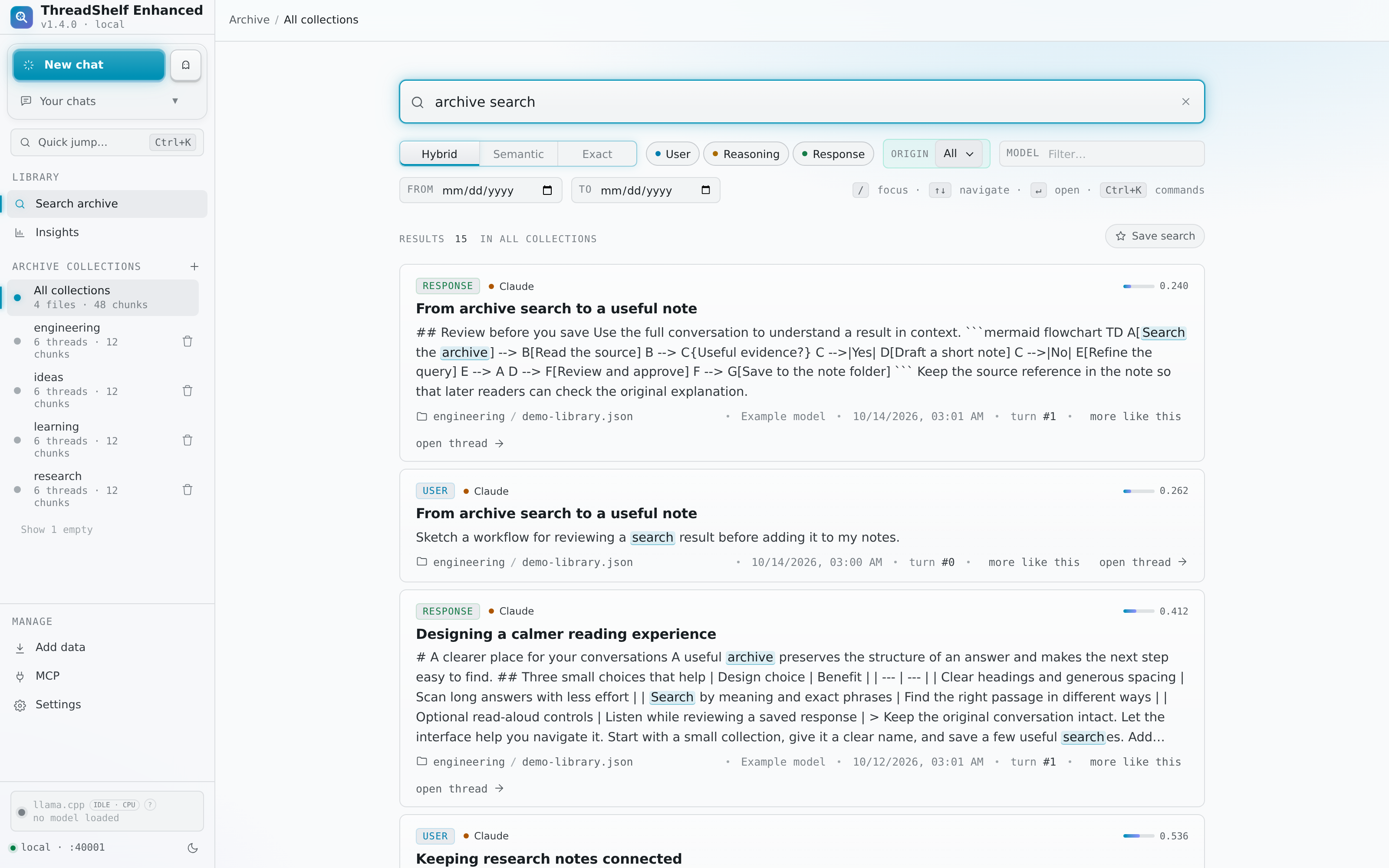
Choose a search mode
| Mode in the interface | API value | What it finds | Useful example |
|---|---|---|---|
| Exact | keyword |
A case-insensitive literal substring in indexed message text | cacheMaxBytes or a remembered sentence |
| Semantic | semantic |
Chunks whose local embeddings are close to the query's meaning | How did we handle interrupted imports? |
| Hybrid | hybrid |
Independent lexical and semantic candidates, merged into one ranked list | migration rollback SQLITE_BUSY |
The examples above illustrate query styles; they are not preloaded conversations. Exact is not a regular-expression or Boolean query language. Quotation marks are literal input, so enter a phrase without extra quotation marks unless those characters are part of the text being sought. Hybrid normalizes Unicode words and folds accents for its lexical branch; Exact retains literal substring behavior, including accents.
Semantic is the default mode for the HTTP API and command-line tool. The web search page also starts with Semantic unless its URL selects another mode. Short Semantic searches in the web interface receive an exact-phrase preference; this is separate from Hybrid's independent lexical retrieval.
Run a focused search
- Open Search and select one collection, or all collections.
- Enter a phrase, question or identifier and choose a mode.
- Set role filters for user prompts, thinking, and assistant responses.
- Narrow by model, date range or conversation origin when those attributes are known.
- Submit the query, inspect several results, and open a result to read the full thread around the matching turn.
Filters are applied before each retrieval branch chooses its candidates. A model or date restriction is not merely a filter on the first unfiltered results. Metadata can nevertheless be absent in an export: a model or date filter cannot recover information that the source did not supply.
The origin control distinguishes ThreadShelf-authored material from imported archive material. ThreadShelf-created chats and continuations carry provenance metadata. A mixed thread may therefore contain both imported and locally authored turns; open the thread to see the context rather than inferring the origin of every message from its collection name.
Use More like this on a result to start a Semantic query from its text. This is a way to explore related material, not an exact duplicate detector. Browser Back returns to the previous search state.
Understand the results
A result represents an indexed chunk, not necessarily a whole conversation. Several chunks may come from one long thread. Each carries enough identity to open its collection, source conversation and original turn. Normalized stored threads let the reader show context without depending on a fresh parse of the original file for modern imports.
Semantic distance orders eligible vectors by cosine distance; lower distance means closer in that embedding space. It is not an accuracy percentage. A Hybrid result found only by the lexical branch may have no distance at all. Clients should leave that score absent rather than fabricate a similarity value.
Hybrid combines rank positions from both branches and adds phrase, title and identifier signals. It first favors a spread of conversations and nonrepeated content, then uses deferred matches if more results are needed. This can make a results page more varied without changing the stored archive. Exact ranking prioritizes substring occurrence count, then date and deterministic identity ties.
Search is bounded: the standard /api/search endpoint returns at most 50 results per request, with a default of 15. It is not an exhaustive export endpoint or an exact conversation-count report. Compatible Reader clients use a separate pagination contract with exact totals and stable result snapshots.
Command-line examples
Run these from an installed source checkout with its compatible Node/npm runtime available:
npm run search -- "interrupted imports" -- --mode hybrid --collection all --n 15
npm run search -- "cacheMaxBytes" -- --mode keyword --roles ai --n 10
npm run search -- "backup strategy" -- --mode semantic --collection archive --json
The CLI defaults to 10 results and accepts --collection, --roles, --model, --from, --to, --n, --mode and --json. Role names are user, thinking, and ai. Date bounds are inclusive ISO timestamps or YYYY-MM-DD values. The CLI does not currently expose an origin flag; use the interface or HTTP API for that filter. See the CLI reference for invocation details.
Local lexical cache
Hybrid can create a disposable SQLite full-text cache inside the configured LanceDB directory, under .threadshelf-search/. This accelerates repeated lexical work without modifying conversations or embeddings. The cache contains derived private text and metadata, so treat it as archive data when deciding what to back up or share.
The cache follows published dataset generations and relevant table state. Missing, busy, damaged or over-budget caches fall back to a complete lexical scan with the same normalization and scoring. A cache failure does not justify returning only a partial set of lexical matches. Two completed cache snapshots per collection are retained; obsolete files are cleared after a later successful build.
To disable its use, set the following server environment value and restart:
THREADSHELF_LEXICAL_CACHE=0The cache build budget is 256 MiB of serialized source rows. This is not a guaranteed final disk size: SQLite indexes add overhead. Search still scans eligible vectors for exact cosine retrieval, so a large archive requires more CPU time and native memory even though JavaScript keeps a bounded number of best candidates.
When expected content is missing
Start with Exact and a short phrase known to occur in the source. Remove model, date, origin and role restrictions, then verify the collection and import-job result. Check whether the conversation is present in the archive but still awaiting index recovery. Repeatedly changing the search wording cannot repair an import that was skipped or an index that has not finished.
For concept queries, compare Semantic and Hybrid and inspect full-thread context. The embedding model's ranking is not a guarantee that the desired passage appears first. Live Markdown notes use their own bounded lexical search; connecting a note folder does not add it to conversation search.
Source references
Behavior is documented from the Enhanced source. For changes after this handbook was built, check the project changelog.